# Rsdoctor
> A one-stop build analyzer for Rspack projects.
## Guide
- [Introduction](/guide/start/intro.md): Rsdoctor is a build analyzer tailored for projects built with Rspack. Rsdoctor is committed to being a one-stop, intelligent build analyzer that makes the build process transparent, predictable, and optimizable through visualization and smart analysis, helping development teams precisely identify bottlenecks, optimize performance, and improve engineering quality. Rsdoctor analyzes projects built with Rspack. For webpack projects, continue using Rsdoctor 1.x or migrate to Rspack. See the migration guide for details.
- [Quick start](/guide/start/quick-start.md): This guide explains how to add Rsdoctor to your project.
- [Features](/guide/start/features.md): Here you can learn about the main features supported by Rsdoctor.
- [CI/CD tutorial](/guide/start/cicd.md): Brief mode generates a self-contained report that can be stored as a CI artifact or uploaded to a CDN.
- [GitHub Actions Integration](/guide/start/action.md): Integrate Rsdoctor analysis in CI/CD workflows using rsdoctor-action
- [CLI tutorial](/guide/start/cli.md): We provide @rsdoctor/cli for you to use Rsdoctor's features locally through the CLI program.
- [AI](/guide/start/ai.md): To help AI better understand Rsdoctor's features, configuration, and best practices so it can provide more accurate assistance during day-to-day development and troubleshooting, Rsdoctor provides the following capabilities: Agent SkillsAgent CLIllms.txtMarkdown docsAGENTS.md
- [Playground](/guide/start/playground.md)
- [Project overall](/guide/usage/project-overall.md)
- [Bundle overall](/guide/usage/bundle-overall.md)
- [Compile overall](/guide/usage/compile-overall.md)
- [Compile alerts](/guide/usage/compile-alerts.md): We have integrated some capabilities based on compilation data detection. If the current compilation result contains data that hits the rules we define, the Compile Alerts module will appear at the bottom of the Rsdoctor main interface, as shown in the image below: This module allows us to visually see some warning information about our project's compilation, which can help us further optimize the project's compilation performance.
- [Bundle alerts](/guide/usage/bundle-alerts.md)
- [Loaders timeline](/guide/usage/loaders-timeline.md)
- [Loaders analysis](/guide/usage/loaders-analysis.md): Rsdoctor provides the Loader Analysis module, which mainly provides statistics on Loaders at the directory and file level. It helps you analyze the compilation of folders and individual files by Loaders. Click on the navigation bar "Compile Analysis" -> "Loader Analysis" option to view the compilation analysis report. Of course, this page will only display the features if the loader analysis capability is enabled features.
- [Plugin analysis](/guide/usage/plugins-analysis.md)
- [Bundle analysis](/guide/usage/bundle-size.md)
- [Module analysis](/guide/usage/module-analysis.md)
- [Resolver analysis](/guide/usage/resolver.md): In the Rsdoctor Module Resolve section, we can see all the source files in the current Rspack project. By clicking on a file, we can view information such as the module paths imported in that file, the before and after resolution path comparison, and the resolution time, as shown in the following image:
- [Compilation diagnostic rules](/guide/usage/rule-config.md): Build diagnostics complement static lint tools such as ESLint. They run against Rspack's build data and can use information such as the ModuleGraph, per-module metadata, and generated runtime code. During the build process, if issues are discovered, they will be visible in the CLI and the final diagnostic summary webpage, as shown below: 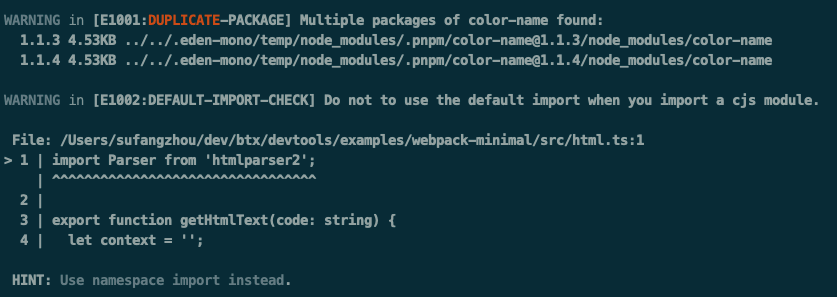
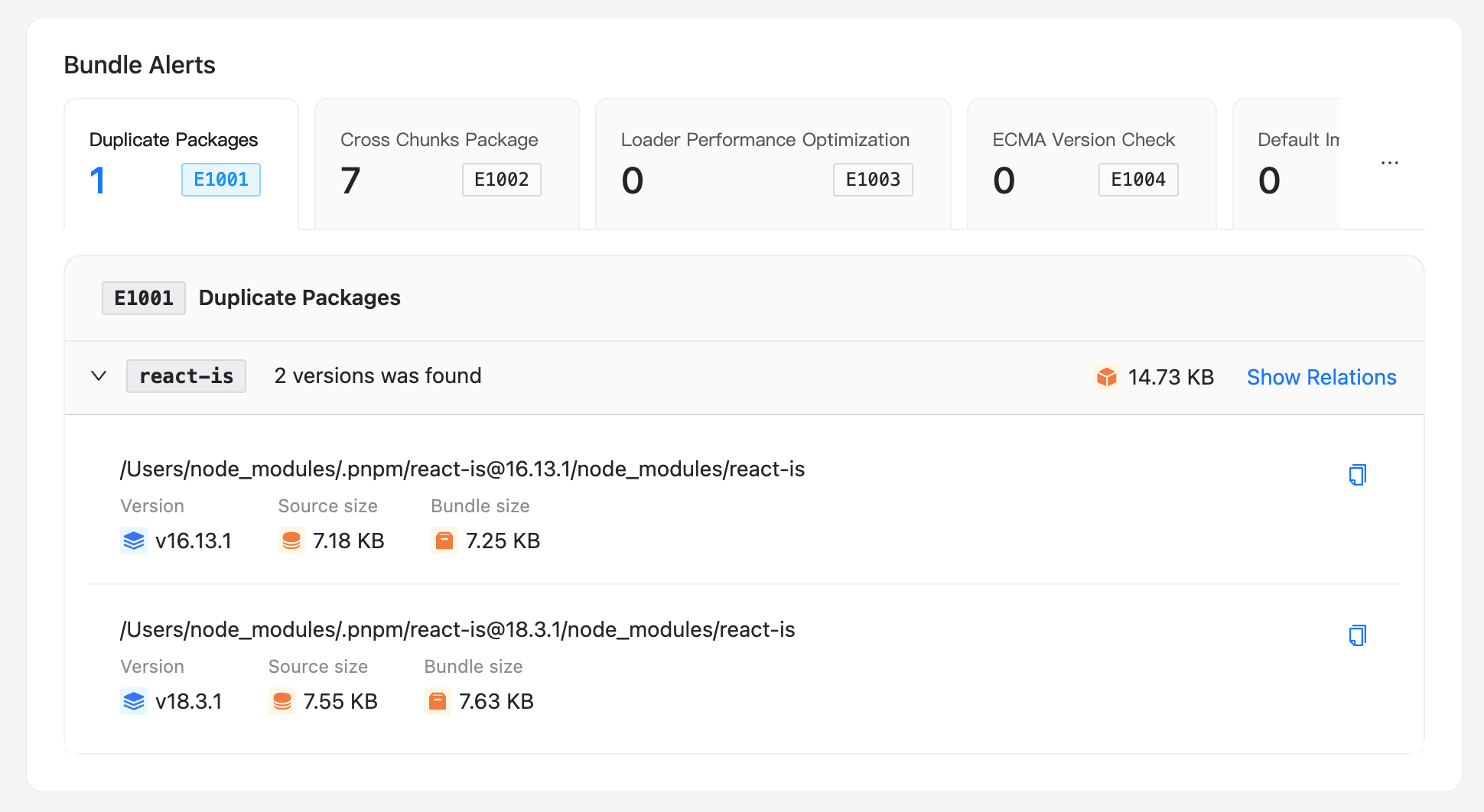 - [Bundle diff](/guide/usage/bundle-diff.md): We provide the Bundle Diff feature, which allows you to compare and analyze the changes between two build bundles. Currently, we offer the following usage methods: Open the report locally with CLIGenerate a JSON report with CLIOnline upload analysis (planned support)
- [Built-in rules](/guide/rules/rules.md)
- [Custom extension rules](/guide/rules/rule-custom.md)
- [Data upload](/guide/rules/upload-data.md): To perform data upload, you need to use the interface of custom extension rules. Please refer to Custom Extension Rules for more information. The same approach used for custom extension rules can also be used for collecting and uploading user data. The only difference is that you don't need to report any errors in the check function. For example:
- [Migrate to Rsdoctor 2.0](/guide/migration/migration-v2.md): Rsdoctor 2.0 consolidates the package structure around Rspack. This release removes several standalone packages. Update dependencies and imports together to avoid resolving a 1.x package with 2.0 code. Use the rsdoctor-migrate-v2 skill to let a coding agent inspect your project, apply the relevant migration steps, and verify the result:
- [FAQ](/guide/more/faq.md)
- [Rule index](/guide/more/rules.md)
- [MCP server](/guide/usage/mcp.md): Rsdoctor 2.x no longer includes @rsdoctor/mcp-server. Use @rsdoctor/agent-cli for current AI-assisted build analysis workflows.See the Rsdoctor 2.0 migration guide for migration steps.The previous MCP instructions are available in the Rsdoctor 1.x archive.
## Config
- [Overview](/config/options/options.md)
- [Terminology](/config/options/term.md)
- [disableClientServer](/config/options/disableClientServer.md): Type: booleanOptional: trueDefault: false, when process.CI is true, the default value is true, meaning the report service is disabled by default in CI environments. Whether to automatically open the Rsdoctor report page. If you do not need to view the analysis report provided by Rsdoctor in the browser, you can enable this configuration item.
- [experiments](/config/options/experiments.md)
- [features](/config/options/features.md): Type: RsdoctorRspackPluginFeatures | ArrayOptional: trueDefault: ['loader', 'plugins', 'bundle']
- [output](/config/options/output.md)
- [server](/config/options/server.md): Type: RsdoctorServerConfigOptional: trueDefault: {} Configure the Rsdoctor report server.
- [supports](/config/options/supports.md): Type: Supports TypesOptional: trueDefault: undefined This option controls detailed analysis behavior, such as BannerPlugin compatibility, bundle parsing, and gzip size calculation.
- [mode](/config/options/mode.md): The removed option accepted the following values: Type: "normal" | "brief" | "lite"lite was removed and is ignored in Rsdoctor 2.x. Use output.reportCodeType instead.Optional: trueDefault: normal These values selected the following report behaviors: normal mode: Generates a .rsdoctor folder in the build output directory, which contains various data files and displays code in the report page. The output directory can be configured via reportDir.brief mode: Generates rsdoctor-report.html in the report output directory. This directory defaults to the build output directory and can be configured via reportDir. All build analysis data is injected into this standalone HTML file, which can be opened directly in a browser. See mode: 'brief' for the available options.lite mode: Based on the normal mode, this mode does not display source code and product code, only showing the information of the bundled code.The top-level mode: 'lite' option was removed and is ignored in Rsdoctor 2.x. The features lite configurations remain supported. Use output.reportCodeType for new configurations.
- [multiCompiler](/config/options/multiCompiler.md): Type: boolean | { group?: string }Default: true RsdoctorRspackPlugin automatically detects compilers created during the same startup, creates isolated analysis data for each compiler, and adds a compiler selector to the report. Rsbuild environments use their environment names, such as web and node. The default compiler keeps the existing .rsdoctor output path. Additional compilers are written to .rsdoctor/compilers/. Set this option to false when the same process creates unrelated compilers together. You can also explicitly group plugin instances:
- [options-shared](/config/options/options-shared.md)
## Blog
- [Rsdoctor blogs](/blog/index.md): Release announcements and practical guides to build analysis and optimization.
- [Announcing Rsdoctor 2.0](/blog/release/release-note-2_0.md): We are excited to announce Rsdoctor 2.0! 🎉 Starting with 2.0, Rsdoctor is fully focused on Rspack. webpack projects can continue using Rsdoctor 1.x. This focus allows Rsdoctor to integrate more deeply with Rspack's built-in capabilities and continue tailoring analysis to its build model and ecosystem. Build analysis data also moves beyond the report UI: developers can investigate issues visually, while coding agents and automation can query the same data directly. Rsdoctor 2.0 also brings faster analysis, broader compiler support, and a smaller installation footprint. Highlights in this release include: Faster analysis with Rspack: Rsdoctor 2.0 is fully focused on Rspack, and expensive data processing runs inside Rspack. When introduced as an option in 1.0, this reduced overall analysis time by more than 20%. In 2.0, it is always enabled and avoids repeated work such as stats conversion.Build analysis for agents: Agent CLI and the Rsdoctor analysis skill let coding agents query build data and return actionable optimization suggestions.Unified multi-compiler analysis: The regular Rspack plugin automatically handles multi-compiler builds, Rsbuild environments, and child compilers while keeping their data isolated.A smaller installation footprint: Core capabilities are consolidated into @rsdoctor/core. With V2, a complete production install contains 18 packages instead of 83 and is 56.6% smaller than 1.6.2.Faster rebuild analysis: Loader caching, fewer unnecessary calculations, and faster report writes reduce median HMR time by about 47% in the benchmark.
- [Announcing Rsdoctor 1.2](/blog/release/release-note-1_2.md): Rsdoctor 1.2 has been released! 🎉 Deep concatenated module analysis: Added the ability to analyze the size of concatenated modules, helping developers more accurately identify the actual build size after Tree Shaking.Bundle Size Analysis with Gzip Support: Bundle size analysis now displays the size after gzip compression, making it easier for developers to understand the real size of production assets.Enhanced Treemap Visualization: Introduced and improved the Treemap (rectangle tree map) feature, allowing developers to gain more intuitive insights into bundle composition and resource distribution.Rsdoctor MCP: Rsdoctor MCP is an LLM-powered build analysis tool that helps developers quickly obtain build analysis results through Q&A interactions.
- [Announcing Rsdoctor 1.0](/blog/release/release-note-1_0.md): We are excited to announce the official release of Rsdoctor 1.0! After a year of development and testing, we are proud to introduce Rsdoctor 1.0 — a build analyzer tailored for the Rspack ecosystem and fully compatible with the webpack ecosystem. Rsdoctor is committed to being a one-stop, intelligent build analyzer that makes the build process transparent, predictable, and optimizable through visualization and smart analysis, helping development teams precisely identify bottlenecks, optimize performance, and improve engineering quality.
- [Announcing Rsdoctor 0.4](/blog/release/release-note-0_4.md): Rsdoctor 0.4 is now released! The new features of Rsdoctor 0.4 include: Brief Mode: Outputs a single HTML file, ideal for CI processes.Bundle Diff: Compare and analyze changes between two build artifacts.Vue Loader Analysis: Added support for loader analysis in Vue projects.
- [Announcing Rsdoctor 0.3](/blog/release/release-note-0_3.md): Rsdoctor 0.3 has been released! The new features of Rsdoctor 0.3 include: Custom Extension Rules: Users can customize their own rule checks through the interface.Support for Banner Plugin: Added support for the Banner Plugin, which adds template wrapping to the bundled code, allowing analysis of code changes.Support for ESM Loader Analysis: Added support for analyzing ESM Loaders in the compilation analysis in Rspack.
- [Announcing Rsdoctor 0.1](/blog/release/release-note-0_1.md): We are excited to announce the release of Rsdoctor 0.1! Rsdoctor is a one-stop build analyzer for Rspack and Webpack. It allows for detailed analysis of the build process and bundles, making the build process more visual and transparent.
- [Loader analysis and optimization](/blog/topic/loader-optimization.md): Optimizing loaders is a common way to improve the performance of Rspack or webpack compilation. In most cases, besides replacing the loader with a faster one, we can also reduce execution by setting module.rule.exclude for the loader. Rsdoctor provides two core modules, Loader Overall and Loader Analysis, to help you optimize based on the loader's invocation information.
- [Duplicate dependency problem](/blog/topic/duplicate-pkg-problem.md): Rsdoctor will report cases where multiple duplicate dependencies exist in the same bundler's artifact.
- [Bundle diff](/guide/usage/bundle-diff.md): We provide the Bundle Diff feature, which allows you to compare and analyze the changes between two build bundles. Currently, we offer the following usage methods: Open the report locally with CLIGenerate a JSON report with CLIOnline upload analysis (planned support)
- [Built-in rules](/guide/rules/rules.md)
- [Custom extension rules](/guide/rules/rule-custom.md)
- [Data upload](/guide/rules/upload-data.md): To perform data upload, you need to use the interface of custom extension rules. Please refer to Custom Extension Rules for more information. The same approach used for custom extension rules can also be used for collecting and uploading user data. The only difference is that you don't need to report any errors in the check function. For example:
- [Migrate to Rsdoctor 2.0](/guide/migration/migration-v2.md): Rsdoctor 2.0 consolidates the package structure around Rspack. This release removes several standalone packages. Update dependencies and imports together to avoid resolving a 1.x package with 2.0 code. Use the rsdoctor-migrate-v2 skill to let a coding agent inspect your project, apply the relevant migration steps, and verify the result:
- [FAQ](/guide/more/faq.md)
- [Rule index](/guide/more/rules.md)
- [MCP server](/guide/usage/mcp.md): Rsdoctor 2.x no longer includes @rsdoctor/mcp-server. Use @rsdoctor/agent-cli for current AI-assisted build analysis workflows.See the Rsdoctor 2.0 migration guide for migration steps.The previous MCP instructions are available in the Rsdoctor 1.x archive.
## Config
- [Overview](/config/options/options.md)
- [Terminology](/config/options/term.md)
- [disableClientServer](/config/options/disableClientServer.md): Type: booleanOptional: trueDefault: false, when process.CI is true, the default value is true, meaning the report service is disabled by default in CI environments. Whether to automatically open the Rsdoctor report page. If you do not need to view the analysis report provided by Rsdoctor in the browser, you can enable this configuration item.
- [experiments](/config/options/experiments.md)
- [features](/config/options/features.md): Type: RsdoctorRspackPluginFeatures | ArrayOptional: trueDefault: ['loader', 'plugins', 'bundle']
- [output](/config/options/output.md)
- [server](/config/options/server.md): Type: RsdoctorServerConfigOptional: trueDefault: {} Configure the Rsdoctor report server.
- [supports](/config/options/supports.md): Type: Supports TypesOptional: trueDefault: undefined This option controls detailed analysis behavior, such as BannerPlugin compatibility, bundle parsing, and gzip size calculation.
- [mode](/config/options/mode.md): The removed option accepted the following values: Type: "normal" | "brief" | "lite"lite was removed and is ignored in Rsdoctor 2.x. Use output.reportCodeType instead.Optional: trueDefault: normal These values selected the following report behaviors: normal mode: Generates a .rsdoctor folder in the build output directory, which contains various data files and displays code in the report page. The output directory can be configured via reportDir.brief mode: Generates rsdoctor-report.html in the report output directory. This directory defaults to the build output directory and can be configured via reportDir. All build analysis data is injected into this standalone HTML file, which can be opened directly in a browser. See mode: 'brief' for the available options.lite mode: Based on the normal mode, this mode does not display source code and product code, only showing the information of the bundled code.The top-level mode: 'lite' option was removed and is ignored in Rsdoctor 2.x. The features lite configurations remain supported. Use output.reportCodeType for new configurations.
- [multiCompiler](/config/options/multiCompiler.md): Type: boolean | { group?: string }Default: true RsdoctorRspackPlugin automatically detects compilers created during the same startup, creates isolated analysis data for each compiler, and adds a compiler selector to the report. Rsbuild environments use their environment names, such as web and node. The default compiler keeps the existing .rsdoctor output path. Additional compilers are written to .rsdoctor/compilers/. Set this option to false when the same process creates unrelated compilers together. You can also explicitly group plugin instances:
- [options-shared](/config/options/options-shared.md)
## Blog
- [Rsdoctor blogs](/blog/index.md): Release announcements and practical guides to build analysis and optimization.
- [Announcing Rsdoctor 2.0](/blog/release/release-note-2_0.md): We are excited to announce Rsdoctor 2.0! 🎉 Starting with 2.0, Rsdoctor is fully focused on Rspack. webpack projects can continue using Rsdoctor 1.x. This focus allows Rsdoctor to integrate more deeply with Rspack's built-in capabilities and continue tailoring analysis to its build model and ecosystem. Build analysis data also moves beyond the report UI: developers can investigate issues visually, while coding agents and automation can query the same data directly. Rsdoctor 2.0 also brings faster analysis, broader compiler support, and a smaller installation footprint. Highlights in this release include: Faster analysis with Rspack: Rsdoctor 2.0 is fully focused on Rspack, and expensive data processing runs inside Rspack. When introduced as an option in 1.0, this reduced overall analysis time by more than 20%. In 2.0, it is always enabled and avoids repeated work such as stats conversion.Build analysis for agents: Agent CLI and the Rsdoctor analysis skill let coding agents query build data and return actionable optimization suggestions.Unified multi-compiler analysis: The regular Rspack plugin automatically handles multi-compiler builds, Rsbuild environments, and child compilers while keeping their data isolated.A smaller installation footprint: Core capabilities are consolidated into @rsdoctor/core. With V2, a complete production install contains 18 packages instead of 83 and is 56.6% smaller than 1.6.2.Faster rebuild analysis: Loader caching, fewer unnecessary calculations, and faster report writes reduce median HMR time by about 47% in the benchmark.
- [Announcing Rsdoctor 1.2](/blog/release/release-note-1_2.md): Rsdoctor 1.2 has been released! 🎉 Deep concatenated module analysis: Added the ability to analyze the size of concatenated modules, helping developers more accurately identify the actual build size after Tree Shaking.Bundle Size Analysis with Gzip Support: Bundle size analysis now displays the size after gzip compression, making it easier for developers to understand the real size of production assets.Enhanced Treemap Visualization: Introduced and improved the Treemap (rectangle tree map) feature, allowing developers to gain more intuitive insights into bundle composition and resource distribution.Rsdoctor MCP: Rsdoctor MCP is an LLM-powered build analysis tool that helps developers quickly obtain build analysis results through Q&A interactions.
- [Announcing Rsdoctor 1.0](/blog/release/release-note-1_0.md): We are excited to announce the official release of Rsdoctor 1.0! After a year of development and testing, we are proud to introduce Rsdoctor 1.0 — a build analyzer tailored for the Rspack ecosystem and fully compatible with the webpack ecosystem. Rsdoctor is committed to being a one-stop, intelligent build analyzer that makes the build process transparent, predictable, and optimizable through visualization and smart analysis, helping development teams precisely identify bottlenecks, optimize performance, and improve engineering quality.
- [Announcing Rsdoctor 0.4](/blog/release/release-note-0_4.md): Rsdoctor 0.4 is now released! The new features of Rsdoctor 0.4 include: Brief Mode: Outputs a single HTML file, ideal for CI processes.Bundle Diff: Compare and analyze changes between two build artifacts.Vue Loader Analysis: Added support for loader analysis in Vue projects.
- [Announcing Rsdoctor 0.3](/blog/release/release-note-0_3.md): Rsdoctor 0.3 has been released! The new features of Rsdoctor 0.3 include: Custom Extension Rules: Users can customize their own rule checks through the interface.Support for Banner Plugin: Added support for the Banner Plugin, which adds template wrapping to the bundled code, allowing analysis of code changes.Support for ESM Loader Analysis: Added support for analyzing ESM Loaders in the compilation analysis in Rspack.
- [Announcing Rsdoctor 0.1](/blog/release/release-note-0_1.md): We are excited to announce the release of Rsdoctor 0.1! Rsdoctor is a one-stop build analyzer for Rspack and Webpack. It allows for detailed analysis of the build process and bundles, making the build process more visual and transparent.
- [Loader analysis and optimization](/blog/topic/loader-optimization.md): Optimizing loaders is a common way to improve the performance of Rspack or webpack compilation. In most cases, besides replacing the loader with a faster one, we can also reduce execution by setting module.rule.exclude for the loader. Rsdoctor provides two core modules, Loader Overall and Loader Analysis, to help you optimize based on the loader's invocation information.
- [Duplicate dependency problem](/blog/topic/duplicate-pkg-problem.md): Rsdoctor will report cases where multiple duplicate dependencies exist in the same bundler's artifact.